My Plan Manager
client portal
Trusted by almost 50,000 clients and their supporters, My Plan Manager’s client portal, available via web and app, is the convenient way to stay on top of your NDIS plan funding.

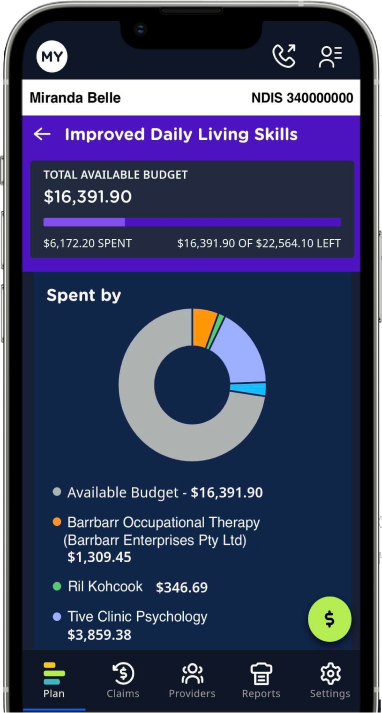
<div style="text-align: left;"> <h2 style="color: rgb(61, 61, 61); font-size: 48px; font-weight: 500; margin: 0px 0px 16px; font-family: gothamrounded-medium, 'Gotham Rounded', sans-serif; line-height: 1.2; text-align: left;"><strong>What can I do in My Plan Manager’s client portal?</strong></h2> <p style="color: #3d3d3d; font-size: 18px; line-height: 1.5; margin: 0 0 20px 0; font-family: 'Noto Sans', sans-serif; font-weight: 400; max-width: 650px;">My Plan Manager’s client portal makes sure you know what funding you have, how much you’ve spent, what you’ve spent it on, and how much is left in your budget – all important parts of life for every NDIS participant.</p> <p style="color: #3d3d3d; font-size: 18px; line-height: 1.5; margin: 0 0 20px 0; font-family: 'Noto Sans', sans-serif; font-weight: 400; max-width: 650px;">Our client portal (web and app) is like having My Plan Manager’s team of experts right there with you – 24 hours a day, seven days a week.</p> <p style="color: #3d3d3d; font-size: 18px; line-height: 1.5; margin: 0 0 20px 0; font-family: 'Noto Sans', sans-serif; font-weight: 400; max-width: 650px;">Whether you’re at home or on the go, you can use our client portal to:</p> </div>
View your NDIS plan budget
Submit invoices and claims for reimbursement
Receive alerts when payments are processed
View your NDIS plan budget
Submit invoices and claims for reimbursement
Receive alerts when payments are processed

Track your spending
Stay in control – receive spending limit notifications by SMS
Generate monthly reports at the click of a button

Track your spending
Stay in control – receive spending limit notifications by SMS
Generate monthly reports at the click of a button
Getting started with My Plan Manager’s client portal

Step 1: Join us as a client

Step 2: Let our team members know if you’d like any of your supporters – like family members, friends, or support coordinators – to have access to the client portal too.

Step 3: We’ll set up client portal access, and let you know when you can log in!

<h2>Why choose My Plan Manager’s client portal</h2>
When we developed the first-ever plan management client portal, we faced questioning looks. But we didn’t let that stop us. After all, why shouldn’t our clients and their supporters be able to access a tool to make managing their funding easier?
Our clients love our client portal because it’s:
Purpose-built
Designed with you in mind, it has every feature you need to stay in control of your plan spending.
Convenient
Accessible on all devices, it can go wherever you do – and give you information in real-time.
Innovative
Supporting anti-fraud technology, it helps us protect your funds from non-compliant invoices and potentially fraudulent claims.

What people are saying

I absolutely love My Plan Manager – they help with even the slightest question you may have and don't make you feel like a burden for asking. I love the constant communication when providers submit their invoices, and knowing they're paid right away. I use the client portal to keep track of funding – it's so easy to check.Carmen (Mum of My Plan Manager client, Dominic)
Frequently asked questions about My Plan Manager’s client portal and mobile app

If you’re a My Plan Manager client (or you have access permission from a client), you can access our client portal through a simple, passwordless log in process – just follow these steps:
1. Visit the client portal log in page here
2. Enter your email address
3. If you receive an SMS code, enter the code and you’ll be logged in. Alternatively, if you receive an email link, click on the link and you’ll be logged in.
Why no password? Well, not only can passwords be difficult to remember, but they can also be easily guessed by cyber criminals. By removing password log ins, we’ve increased the security of our client portal and your information.
If you’re a My Plan Manager client (or you have access permission from a client) and you use an iPhone or iPad, you can get our mobile app by searching for ‘My Plan Manager’ in the App Store, then downloading our app to your device.
Take me to the App Store.
If you use an Android phone or tablet, you can get our app by searching for ‘My Plan Manager’ in the Google Play Store, then installing it on your device.
Take me to the Google Play Store.
My Plan Manager’s mobile app is available through the App Store for iOS (iPhone) and the Google Play Store for Android.
It’s important to check every now and then to make sure you’re using the latest version – that way you’ll always have access to updated features and security patches.
If you notice any issues with our mobile app, they might be resolved by installing the latest update, so it’s worth giving that a try before you contact us.
If a significant update is required, you’ll be notified through our client portal.
Apps you download from the App Store are automatically updated by default, but if there’s an issue, you can also update them manually.
To manually update our mobile app in iOS (iPhone), open the App Store and tap your profile at the top of the screen. Then, scroll down to see pending updates and release notes, and tap ‘Update’ next to the My Plan Manager mobile app.
For Android, unless you have the ‘Auto-update apps’ setting switched on under ‘Settings > Network Preferences’, you’ll need to update our mobile app manually.
To do that, just open the Google Play Store and tap the profile icon at the top of the screen. After that, tap ‘Manage apps and devices’, then tap ‘Update’.
If you have any questions, you can contact My Plan Manager and our team will be more than happy to help.